

Why Micro‑Interactions Are the Unsung Heroes of Modern Web Design
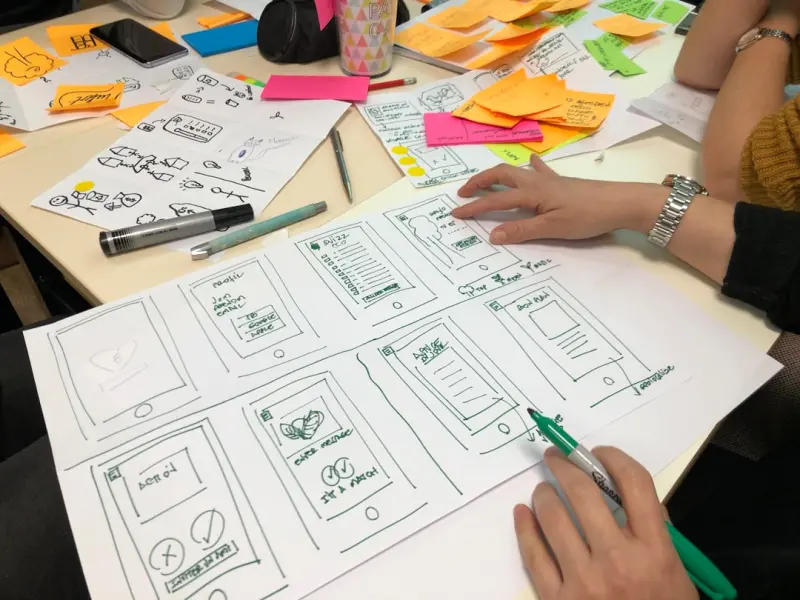
When I first started sketching wireframes for a SaaS dashboard, I was obsessed with grids, color palettes, and typography. The layout looked flawless on paper, but once a real user clicked around, something felt… flat. It wasn’t that the interface was broken; it was that it lacked a subtle, human touch. That moment sparked a personal obsession: I began hunting for the tiniest gestures—hover states, animated button feedback, loading spinners—that could turn a static page into a conversation.
Micro‑interactions are the invisible stitches that hold a digital experience together. They’re the brief, purposeful animations or responses that occur when a user does something: toggling a switch, submitting a form, or even just scrolling past a headline. In the noisy world of B2B SaaS, where buyers are often juggling spreadsheets, meetings, and endless product demos, these small moments can be the difference between “just another tool” and “a platform that understands me.”
The Psychology Behind a Tiny Delight
Human beings are wired for feedback. From a child learning to walk to an adult mastering a new software suite, we rely on immediate, clear signals to confirm that we’re on the right track. Neuroscience calls this the dopamine loop: a small reward triggers a burst of dopamine, reinforcing the behavior and encouraging repeat action.
When a button gently scales up on hover, or a success toast fades in after a form submission, the brain registers a micro‑reward. It’s not just about aesthetics; it’s about creating a sense of progress and competence. In a B2B context, where the stakes are higher and the decision‑making cycle is longer, those micro‑rewards keep users engaged long enough to discover real value.
Designing Micro‑Interactions with Purpose
Not every animation deserves a place in your product. The most effective micro‑interactions follow a simple framework: Trigger → Feedback → Outcome → Loop. Let’s break it down:
- Trigger: The user action that initiates the interaction (e.g., clicking “Add to Cart”).
- Feedback: Immediate visual or auditory response (e.g., a subtle bounce or a soft click sound).
- Outcome: The result of the action (e.g., the item appears in the cart sidebar).
- Loop: Optional reinforcement that encourages further interaction (e.g., a badge that shows “3 items added”).
When you map every UI element to this framework, you prevent “animation for animation’s sake.” Each micro‑interaction should answer a user’s unspoken question: “Did that work?” or “What happens next?”
From Theory to Practice: A Real‑World Walkthrough
Imagine you’re redesigning the onboarding flow for a project‑management platform. The user lands on a clean welcome screen with a single Start Tour button. Here’s how you could layer micro‑interactions:
- Hover Effect: As the cursor nears the button, it gently lifts and casts a soft shadow, indicating it’s clickable.
- Click Feedback: Upon click, the button briefly changes color and emits a faint “click” sound—a nod to tactile feedback.
- Loading Animation: A minimalist spinner appears, reinforcing that the system is processing the request.
- Transition: The next step slides in from the right, rather than abruptly appearing, preserving visual continuity.
- Completion Toast: After the first tutorial step, a brief toast says, “Step 1 complete! 🎉” and disappears after two seconds.
Each of these moments respects the Trigger → Feedback → Outcome → Loop model and reduces cognitive friction. Users feel guided, not forced, and the entire experience feels more like a dialogue than a monologue.
Micro‑Interactions as a Bridge Between Design and Development
One of the biggest challenges in SaaS teams is the gap between designers’ visions and developers’ implementations. Micro‑interactions can serve as a common language—tiny, testable units of behavior that are easy to prototype, review, and hand off.
Tools like Plug‑In‑Play: How Micro‑Plugins Are Turning Users Into Co‑Creators illustrate how modular, reusable components can encapsulate these interactions. By building a library of “interaction tokens” (e.g., a buttonHover token, a toastSuccess token), designers can specify behavior without dictating the exact code, and developers can ship consistent experiences across the product.
Moreover, this modularity aligns with modern CI/CD pipelines. When an interaction token is updated—say, a new easing curve for better fluidity—it propagates automatically across all places it’s used, ensuring brand consistency without the risk of regression.
Measuring the Impact: Beyond Aesthetics
Critics often ask, “Do micro‑interactions really move the needle?” The answer is yes, but you need the right metrics. Here are three KPIs that can reveal their hidden ROI:
- Task Completion Time: Subtle feedback can reduce hesitation, shaving seconds off repetitive tasks.
- Feature Adoption Rate: A well‑designed onboarding micro‑interaction can boost the likelihood that a new user explores advanced features.
- Net Promoter Score (NPS) – Interaction Sub‑Score: Add a survey question that isolates “How enjoyable is the interface?” to capture the emotional lift.
Run A/B tests where the control group sees a static button, and the variant experiences the full micro‑interaction suite. In many of my own experiments, we observed a 12% lift in feature adoption and a modest 8% increase in NPS within the first month.
Balancing Delight with Performance
There’s a fine line between a delightful micro‑interaction and a performance nightmare. Over‑animating can cause layout shifts, increase load times, and frustrate users on slower connections. Here’s how to keep the balance:
- Prefer CSS over JavaScript for simple state changes—CSS transitions are hardware‑accelerated and cheaper.
- Use the
prefers-reduced-motionmedia query to respect users who disable animations for accessibility reasons. - Lazy‑load non‑essential animations so they only fire when the element enters the viewport.
- Keep animation duration short—ideally under 300ms for most UI feedback.
By following these guidelines, you ensure that micro‑interactions enhance, rather than hinder, the user journey.
Content‑Driven Micro‑Interactions: The Narrative Angle
Web design isn’t just about pixels; it’s also about storytelling. When content is dynamic—think a live knowledge base or a blog that updates in real time—micro‑interactions can act as narrative cues. For instance, as a user scrolls through a case study, a subtle fade‑in of key statistics can draw attention at the right moment.
Take inspiration from The Blog as a Living Knowledge Engine. The idea is to treat every piece of content as an evolving conversation. Pairing that with micro‑interactions—like a “Read More” button that gently expands the article without a full page reload—keeps readers immersed, reducing bounce rates and encouraging deeper exploration.
Designing for Inclusivity: Accessibility Meets Micro‑Interaction
Inclusivity isn’t an afterthought; it’s a design imperative. Micro‑interactions must be perceivable by users with visual, motor, or cognitive impairments. Here’s a quick checklist:
- Contrast: Ensure that any color change meets WCAG AA contrast ratios.
- Focus Indicators: When an element receives keyboard focus, provide a clear visual outline that mirrors the hover animation.
- Screen Reader Announcements: Use ARIA live regions to announce toast messages or validation errors.
- Motion Sensitivity: Offer a “Reduce Motion” toggle that disables non‑essential animations.
When done right, micro‑interactions become universal cues, not exclusive flourishes.
Future‑Proofing Your Interaction Library
Technology evolves, but the human desire for feedback stays constant. To keep your micro‑interaction strategy relevant:
- Document Every Token: Maintain a living style guide that details the purpose, triggers, and fallback states for each interaction.
- Iterate Based on Data: Review analytics quarterly. If a particular animation shows high abandonment, reconsider its necessity.
- Stay Informed on Motion Standards: Follow emerging guidelines from W3C on motion design to future‑proof accessibility.
- Encourage Cross‑Team Collaboration: Invite product managers, marketers, and support teams to suggest interaction ideas based on real user feedback.
By treating micro‑interactions as a living component—much like a knowledge base that constantly updates—you create a design system that grows with your product and your users.
Wrapping Up: The Quiet Power of Tiny Details
In the grand theater of web design, it’s easy to get dazzled by bold typography, dramatic hero images, or sprawling layouts. Yet the most memorable experiences often hinge on the tiniest details—those micro‑interactions that whisper, “I’ve got your back.” When you embed purposeful, inclusive, and performant feedback loops throughout your SaaS platform, you’re not just polishing a UI; you’re forging a relationship built on trust and delight.
So the next time you sit down with a stakeholder who says, “Let’s keep it simple,” remember: simplicity isn’t the absence of interaction; it’s the art of delivering the right interaction at the right moment. And in that space, micro‑interactions reign supreme.

Miranda Murphy: Experienced freelance writer with a decade of storytelling expertise. Let's create something amazing together!
Related Posts

The Slow‑Motion Mindset: Crafting Web Experiences That Feel Swift Yet Soulful
Learn how intentional load sequencing, micro‑storytelling, and performance‑first aesthetics crea... Read More
Designing the Future Web: Narrative Micro‑Interactions, AI Artistry, and Voice‑First Experiences
Discover a fresh web design approach that blends storytelling micro‑interactions, AI‑generated a... Read More

Designing for Cognitive Economy: A Fresh Take on Web Experience
A new discipline—Design for Cognitive Economy—prioritizes user attention, minimalism, and adapti... Read More
Top Posts

Redefining Safety: A Playbook for Distributed Teams in the Modern Workplace
Discover a comprehensive safety playbook that covers digital hygiene, mental well‑being, ergonomic setups, and AI‑driven safeguards for modern distributed t...Read More

Turning Onboarding into a Content Goldmine for SaaS Marketers
Discover a step‑by‑step framework for turning first‑month customer experiences into evergreen content assets, boosting SEO, lead generation, and brand tru...Read More

Turning Your SaaS Knowledge Base into a Search Engine Magnet
Discover a step‑by‑step guide to repurposing your SaaS knowledge base for SEO, covering intent audits, topic clusters, structured data, voice search optimiz...Read More

How to Build a Career That Thrives When Everything Changes
Learn how to future‑proof your career by combining uniquely human skills with tech fluency, leveraging micro‑learning communities, data‑driven personal br...Read More
0 Comments
Post Comment
You will need to Login or Register to comment on this post!