
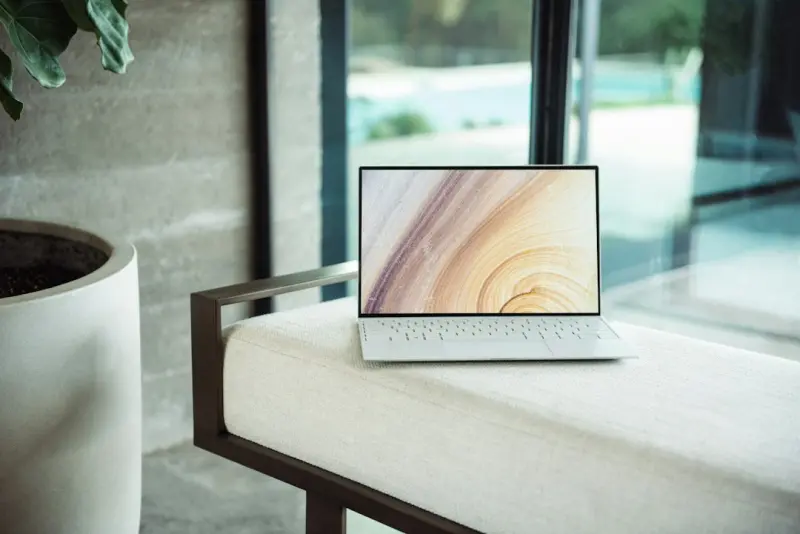
When I first unboxed my latest laptop, the feeling was almost ceremonial: a sleek chassis, a whisper‑quiet fan, and a promise that this machine could do more than just run spreadsheets. In the past few months, a quiet revolution has been reshaping the PC & laptops landscape—one that blends generative AI, modular design, and eco‑conscious engineering into a single, portable powerhouse. If you’ve ever wondered why the next laptop you buy feels less like a tool and more like a personal co‑pilot, you’re about to get the full story.
The Rise of the AI‑First Laptop
Artificial intelligence used to be a buzzword that lived in the cloud, tucked away in data centers. Today, it lives on your lap. Major OEMs are embedding dedicated AI accelerators—tiny chips designed for neural‑network inference—directly onto the motherboard. This shift means tasks that once required a separate server, like real‑time transcription, image enhancement, or intelligent email triage, now happen instantly, locally, and offline.
Why does this matter? Because latency is the enemy of productivity. When you dictate a quick note and the laptop transcribes it in milliseconds, you stay in the flow. When you edit a photo and the AI suggests lighting tweaks without a lag, you keep your creative momentum. The AI‑first laptop is essentially a personal supercomputer that anticipates and augments your workflow.
Modular Upgrades: The Laptop That Grows With You
For years, the laptop market has been dominated by the “sell‑and‑replace” model. You buy a machine, use it for a few years, then toss it for the latest spec. That model is finally cracking under the weight of sustainability concerns and user frustration. Enter modular laptops: devices designed with swappable components—RAM, storage, even GPUs—accessible without a screwdriver.
Think of it as the Lego of computing. Want more VR‑ready performance? Snap in a new graphics module. Need extra battery life for a cross‑country train ride? Add a high‑capacity pack. The modular approach extends the lifespan of hardware, reduces e‑waste, and gives power users the flexibility they’ve always wanted.
One of the most compelling examples is the reconfigurable chassis that separates the core compute board from the peripheral shell. This design not only eases repairs but also opens doors for third‑party innovators to create niche modules—like a dedicated AI inference chip for developers, or a secure enclave for crypto wallets.
Security in the Remote Era: From Peripherals to Core Architecture
Remote work has turned laptops into the front line of corporate security. Traditional endpoint protection—antivirus, firewalls, VPNs—still matters, but they’re no longer enough. Modern threats target firmware, BIOS, and even the supply chain. The new generation of laptops is responding with security baked into the silicon.
Hardware‑based root of trust, encrypted storage keys stored in a TPM (Trusted Platform Module), and real‑time attestation of boot integrity are becoming standard. Moreover, some manufacturers are integrating advanced privacy controls that learn from usage patterns to flag anomalies before they become breaches. These systems can, for instance, detect if a user’s typing rhythm suddenly changes—a possible indicator of credential theft.
Beyond hardware, the operating systems themselves are evolving. We see more granular permission models that separate personal and work data, even on a single device. This “dual‑persona” approach ensures that if a corporate account is compromised, personal files remain insulated, and vice versa.
Eco‑Design: From Recycled Plastics to Carbon‑Neutral Production
The environmental impact of laptops is finally getting the scrutiny it deserves. The average device contains a cocktail of rare earth minerals, plastics, and adhesives that don’t decompose easily. Leading manufacturers are now committing to carbon‑neutral production lines, reclaimed aluminum frames, and packaging made from 100% post‑consumer waste.
But the real game‑changer is the circular economy model. Some companies now offer a trade‑in program where your old laptop is refurbished and resold, with a portion of the revenue credited toward a new purchase. This not only reduces landfill waste but also creates a marketplace for affordable, high‑performance devices in emerging economies.
When evaluating a laptop, ask yourself: What percentage of the chassis is recyclable? Does the brand publish a carbon‑footprint report? Are the batteries designed for easy replacement? These questions will help you make a purchase that aligns with both your performance needs and your values.
Performance Meets Portability: The Sweet Spot of Thin‑and‑Light
There’s a lingering myth that you can’t have both power and portability. Recent advances in ARM‑based processors and custom silicon have shattered that notion. Devices now deliver the horsepower of a desktop while staying under three pounds. The secret? Efficient chip design, integrated memory, and sophisticated thermal engineering that spreads heat across the chassis rather than relying on a noisy fan.
For professionals who travel frequently—consultants, digital nomads, field engineers—this balance is crucial. A laptop that can run multiple virtual machines, handle 4K video editing, and stay cool on a cramped airplane tray table is no longer a fantasy.
And don’t overlook the impact of high‑refresh‑rate displays (120 Hz and above) on both productivity and eye strain. Smooth scrolling through long documents, fluid scrolling in web apps, and crisp color rendering for design work all contribute to a more comfortable, efficient day.
Software Ecosystem: From Cloud‑Centric to Edge‑Optimized
Hardware upgrades are only half the story. The software stack must evolve to harness the AI and security capabilities of modern laptops. Edge‑optimized applications—those that process data locally before sending a summary to the cloud—are gaining traction. This reduces bandwidth usage and protects sensitive data.
Developers are also leveraging semantic AI frameworks that adapt to user intent on the fly. Imagine a spreadsheet that suggests formulas as you type, or a presentation tool that automatically designs slides based on your spoken outline. These intelligent assistants are shifting the paradigm from “software as a tool” to “software as a collaborator.”
For enterprises, the shift means rethinking deployment strategies. Instead of forcing every device into a uniform cloud environment, IT can push lightweight AI agents to laptops, allowing each machine to perform complex tasks autonomously while staying compliant with corporate policies.
Future Outlook: What to Expect in the Next Generation
Looking ahead, three trends will dominate the PC & laptop market:
- Hybrid Compute Nodes: Laptops will act as both end‑user devices and micro‑servers, capable of hosting containerized workloads that previously required a separate machine.
- Zero‑Trust Hardware: Every component, from the SSD to the Wi‑Fi card, will have its own identity and cryptographic verification, making it virtually impossible for rogue hardware to infiltrate a system.
- Adaptive Form Factors: Flexible OLED screens, detachable keyboards, and even foldable chassis will let users morph their device to fit the task—tablet for sketching, laptop for coding, mini‑tablet for quick notes.
These innovations promise a future where your laptop isn’t just a device you carry; it’s an extension of your mind, capable of learning, protecting, and evolving alongside you.
Practical Tips for Choosing Your Next Laptop
Now that the landscape is clearer, here are actionable steps to pick the right machine for you:
- Define Your Core Use Cases: Are you a developer needing multiple VM instances? A designer craving color accuracy? Or a remote worker prioritizing video‑call quality? List the top three tasks that dominate your day.
- Prioritize AI Acceleration: Look for laptops with dedicated AI chips or GPUs that support Tensor cores. Even if you don’t use AI today, future software will likely leverage it.
- Check Modularity: If you anticipate needing upgrades, choose a model with accessible RAM, SSD, and possibly GPU slots.
- Assess Security Features: Ensure the device supports hardware TPM, secure boot, and offers a dual‑persona OS mode.
- Evaluate Sustainability Credentials: Research the manufacturer’s carbon‑neutral initiatives, recyclability scores, and trade‑in programs.
- Test the Display: Spend at least 15 minutes scrolling, reading, and watching video on the screen. Look for brightness above 300 nits, color gamut covering at least 90% DCI‑P3, and a high refresh rate.
- Read Independent Benchmarks: Manufacturer claims can be optimistic. Look for third‑party reviews that test AI inference speed, thermals, and battery life under real‑world workloads.
Following this checklist will help you avoid the common trap of buying a laptop that’s either over‑engineered for your needs or under‑powered for future demands.
Conclusion: Embrace the Laptop as a Living Companion
The PC & laptops market is undergoing a transformation that mirrors the broader shift toward intelligent, sustainable, and secure technology. Your next laptop will likely be more than a box of silicon; it will be a dynamic partner that learns from you, protects your data, and adapts to the tasks you throw at it. By understanding the emerging AI‑first architecture, modular upgrade pathways, and eco‑focused design, you can make an informed purchase that serves you today and remains relevant for years to come.

Sanji Patel has dedicated 25 years to the SEO industry. As an expert SEO consultant for news publishers, he emphasizes providing both technical and editorial SEO services to news publishers worldwide. He frequently speaks at conferences and events globally and offers annual guest lectures at local universities.
Related Posts

Modular Laptops: The Unsung Hero of Remote Work Efficiency
Modular laptops let remote teams customize performance, extend device lifespans, and lower total own... Read More
Why Modular Laptops Are the Secret Weapon for Modern Knowledge Workers
Modular laptops let you upgrade memory, storage, and GPU on the fly, extending device lifespan and c... Read More
Why Modular Laptops Are the Secret Weapon for Tomorrow’s Workflows
Modular laptops let you upgrade CPU, GPU, battery, and more without replacing the whole device, offe... Read More
Top Posts

Smart Pet Parenting: Wearables & Sustainable Care
A deep dive into how wearable technology, data‑driven habits, and sustainable product swaps can transform pet care, improve your furry friend’s wellbeing, a...Read More

The Magic of Tiny Routines: How Simple Daily Rituals Nurture Your Baby’s Growing Mind
Learn how everyday rituals—like sensory warm‑ups, consistent cues, and a calming bedtime story—shape your baby's brain, reduce stress, and lay the groundw...Read More

Embracing Sustainable Living as a Senior: A Journey to a Greener Tomorrow
As a senior, it's never too late to make a positive impact on the planet. Learn how to live sustainably, reduce your environmental footprint, and promote your h...Read More

Branding in a Sustainable World: How Authentic Stories Drive Growth
Explore how authentic storytelling and sustainable practices are reshaping branding, building trust, and fueling growth in today’s eco‑conscious market....Read More
0 Comments
Post Comment
You will need to Login or Register to comment on this post!